ACNH Neighborhood Layout Ideas for Villager Homes, Paths, and Yards
A strong ACNH neighborhood layout is more than ten houses in a row. It has comfortable spacing, clear paths, room for each villager yard, and a shared feature that makes the residential area feel like a real part of your island. Use this guide to plan the district before moving houses, placing fences, or terraforming a tiered neighborhood.
Quick Answer: What Makes a Good ACNH Neighborhood Layout?
A good ACNH neighborhood layout gives every villager home a clear front path, enough room for a small yard, and a route that connects back to Resident Services, shops, beaches, or the museum. The easiest starting plan is two rows of five homes with a central walking path, but the best design depends on your island shape and theme.
Before moving houses, decide whether the neighborhood should be efficient, scenic, natural, urban, or tiered. Efficient layouts group homes closely for daily visits. Scenic layouts give each house a small story through yards, gardens, or viewpoints. Tiered layouts look dramatic but need careful incline planning, because every height change affects movement.
- Place the ten villager homes as footprints before adding fences or furniture.
- Leave walking space in front of each home so doors, yards, and paths do not collide.
- Add one shared feature such as a park, fountain, market row, orchard, or mailbox square.
- Connect the district to your main island loop instead of making it a dead-end residential corner.
How to Plan Villager House Spacing Before You Build
Many search results show pretty finished neighborhoods, but the hard part is scale. A villager home, front yard, fence line, tree, path, and decoration can fill space faster than expected. If you design only from screenshots, the district may look charming but feel cramped when you walk through it every day.
Start in an ACNH island planner or on graph paper. Mark the terrain first, then place homes as blocks, then add path width, yard depth, and shared scenery. Decoration should be the last layer, because moving a house after decorating usually means rebuilding the whole block.
- Pick the district role. Decide whether the neighborhood is a daily-use home loop, a scenic village, a town street, a forest hamlet, or a tiered overlook.
- Place house footprints first. Arrange all ten homes before placing fences, trees, cliffs, or custom paths. This reveals whether the idea actually fits.
- Reserve front-yard depth. Each home needs a readable front approach. Even a small yard works if it has a path, one focal item, and space to enter the door.
- Plan the shared route. Use one main path through the neighborhood, then add short branches to each home rather than ten disconnected mini paths.
- Check bridge and incline demand. Tiered or island-separated neighborhoods can look great, but they should not consume crossings needed elsewhere.
- Decorate by personality groups. Give homes small cues, such as garden, workshop, reading nook, beach yard, or cafe corner, after the layout works.
9 Buildable ACNH Neighborhood Layout Ideas
These Animal Crossing neighborhood ideas are written as planning patterns. Each layout explains who it fits, how to test it in the planner, and what mistake to avoid before you spend Bells moving villager houses.
Two-Row Village Block
Place five homes on each side of a central path. It is easy to navigate, quick for daily villager visits, and works with town, cottagecore, and suburban themes.
- Best for
- Players who want an organized residential area without complex terraforming.
- Planner setup
- Draw one main path first, then set homes in two staggered rows so doors do not visually collide.
- Build note
- Break the grid with trees, wells, benches, flower beds, or curved path edges so it does not feel like storage.
Central Park Neighborhood
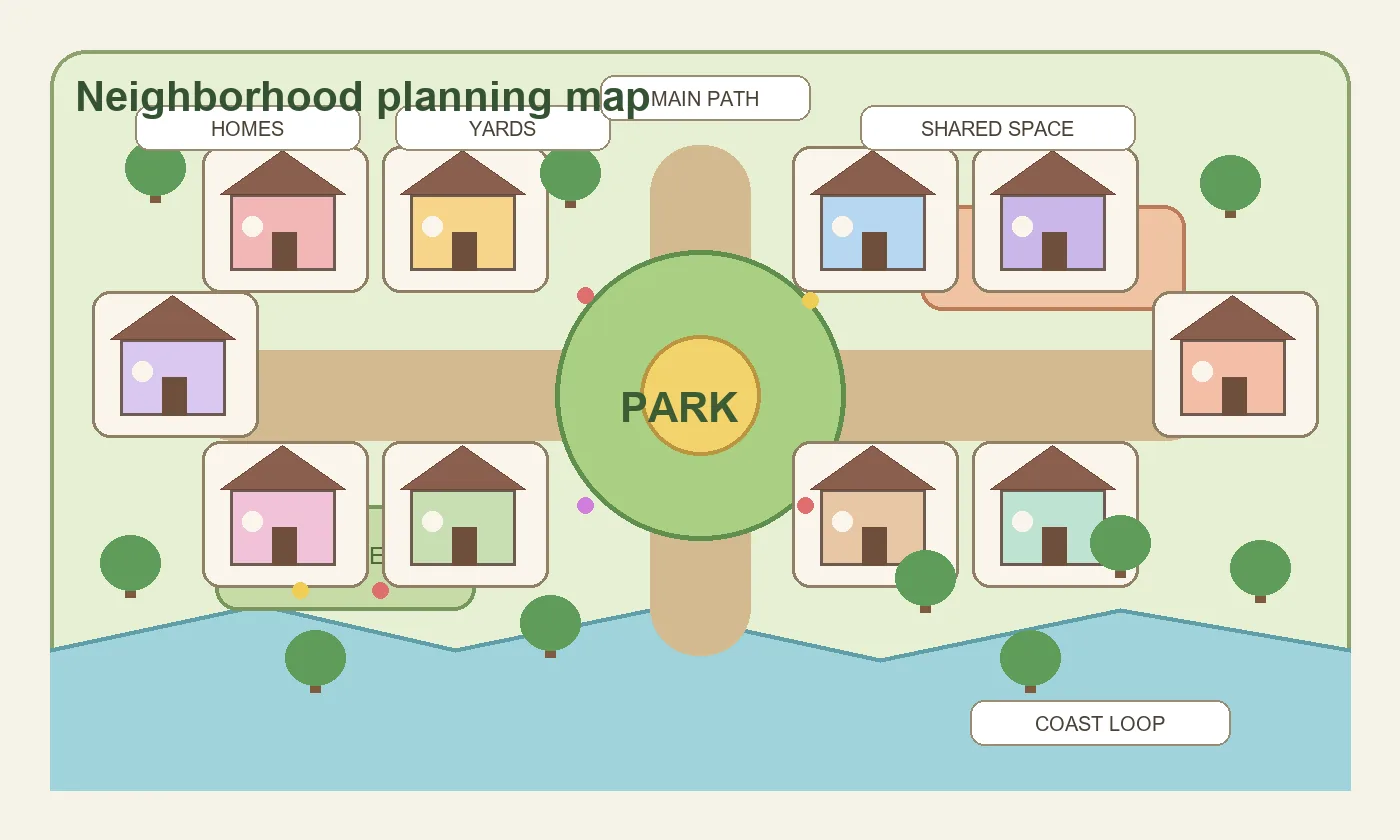
Arrange homes around a small park, fountain, playground, picnic area, or garden square. The shared center makes the district feel intentional.
- Best for
- Community-style islands, cozy villages, and players who want a photo-friendly residential hub.
- Planner setup
- Block the park first, then place homes around it with enough room for short paths to the shared feature.
- Build note
- Keep the park simple. Too many items in the middle can block movement between houses.
Tiered Hillside Neighborhood
Use two or three elevation levels so homes overlook paths, waterfalls, or a lower plaza. This creates strong depth for dream visits and screenshots.
- Best for
- Players who like dramatic terraforming and do not mind planning inclines carefully.
- Planner setup
- Mark incline positions before placing houses. Then test whether each home still has a comfortable front yard.
- Build note
- Avoid putting every house on a separate cliff. It looks fragmented and can waste inclines.
Forest Hamlet Layout
Scatter homes along a winding trail with trees, mushrooms, flowers, and small clearings. It feels natural without losing the logic of a neighborhood.
- Best for
- Cottagecore, forestcore, fairycore, and natural island themes.
- Planner setup
- Draw one looping trail, then place homes in clearings beside the loop instead of forcing a straight grid.
- Build note
- Leave enough open tiles around doorways. Dense trees can make the area hard to walk through.
Market Street Residential Row
Place villager homes behind or beside stalls, shopfronts, cafes, and street furniture to create a lived-in town district.
- Best for
- Urban, citycore, shopping street, and European village themes.
- Planner setup
- Plan a wide street first, then place homes as storefront-like anchors with alleys or side yards.
- Build note
- Use repeated path edges and lamps for cohesion, but vary each yard so every home still has character.
Split Neighborhood Districts
Divide ten homes into two or three smaller clusters. This prevents one giant residential block from dominating the island.
- Best for
- Large islands, mixed-theme maps, and players who want villagers near different zones.
- Planner setup
- Group homes by two to four near beaches, forests, farms, or shops, then connect clusters with the main island loop.
- Build note
- Use clear signs, paths, or landmarks so the split design feels planned rather than scattered.
Cul-de-Sac Circle
Arrange homes around a round or oval path with a tree, fountain, plaza tile, or flower bed in the middle.
- Best for
- Suburban, town, kidcore, and small compact neighborhoods.
- Planner setup
- Sketch the central oval first, then place doorways facing the shared route as evenly as possible.
- Build note
- A perfect circle is not required. A softened square or oval is easier to build with ACNH path tools.
Beachside Residential Strip
Put homes near the coast with boardwalk paths, fishing gear, surf items, shell stalls, and beach gardens.
- Best for
- Tropical, resort, fishing village, and summer island designs.
- Planner setup
- Mark beach ramps, rocks, pier access, and narrow sand areas before placing homes near the coast.
- Build note
- Keep beach furniture in small scenes because coastlines are narrow and can become cluttered quickly.
No-Terraforming House Loop
Use your existing rivers and cliffs, then create a comfortable loop that links homes without flattening the island.
- Best for
- Players who want a lower-effort redesign or are nervous about major terraforming.
- Planner setup
- Trace the current map, mark where homes already sit, then move only the houses that block the main loop.
- Build note
- This layout often feels more natural because it works with your island shape instead of replacing it.
Neighborhood Planning Workflow: From Footprints to Finished Yards
Plan the neighborhood in layers. The first layer is footprint and route. The second layer is yard shape. The third layer is theme and decoration. If you reverse that order, small furniture decisions start controlling the whole map.
Use the table to decide what belongs in the planner and what can wait until you are decorating in Animal Crossing: New Horizons. The goal is to catch spacing problems before they cost Bells, Nook Miles, and time.
For a deeper full-island structure, pair this page with the ACNH island layout ideas guide and the planner template.
| Planning layer | Decide before moving houses | Leave for later |
|---|---|---|
| Footprints | Number of homes per cluster, front-door direction, main path, and shared feature. | Final flowers, signs, small items, and fence color. |
| Routes | Connections to Resident Services, shops, beaches, bridges, and inclines. | Tiny shortcuts, hidden picnic spots, and decorative stepping stones. |
| Yards | Minimum yard depth, shared garden areas, mailbox or plaza space, and door access. | Personality-specific furniture and seasonal details. |
| Terrain | Whether the district is flat, split, tiered, beachside, or forested. | Waterfall shapes, cliff edge decoration, and final tree density. |
ACNH Neighborhood Layout Checklist
Run through this checklist before you confirm a residential design. It helps separate a buildable layout from a screenshot-only idea.
Spacing and Movement
- Every villager door has a clear path in front of it.
- The main route reaches all homes without constant backtracking.
- Homes are not so close that fences, trees, and yards collide.
- The neighborhood connects to at least one useful island route.
- Bridge and incline use still leaves resources for other island zones.
Theme and Daily Use
- Each home can have a small yard or personality cue.
- The shared feature is visible but does not block the central path.
- The district still works when trees, flowers, and seasonal items are added.
- Visitors can understand where to walk from the first path.
- The layout can be simplified if terraforming becomes too expensive.
Common Neighborhood Layout Mistakes to Avoid
Most weak residential areas fail because the planner skipped scale. The ideas below are easy to fix early and frustrating to repair after every house has been moved.
- Packing all homes into a tight rectangle. A compact grid is efficient, but without yard space or path breaks it can feel like a storage lot instead of a neighborhood.
- Designing one beautiful yard before placing all houses. Finish the full footprint first. Otherwise one detailed yard can force awkward spacing for the other nine homes.
- Using cliffs before planning inclines. Tiered neighborhoods need movement first. If the incline is in the wrong place, the whole district becomes slow to use.
- Forgetting villager personalities. A neighborhood feels better when yards have small differences, such as music corner, garden, reading nook, workshop, or beach hangout.
- Making the neighborhood a dead end. Connect it to a loop, shop route, beach route, or museum path so daily visits do not require walking in and out the same way.
Useful References for Neighborhood Planning
Use these internal and external references to check scale, constraints, and planning order before you start moving homes.
- ACNH Island Layout Ideas - Internal guide for choosing the larger island structure that the neighborhood should support.
- ACNH Island Planner Template - Worksheet for mapping fixed landmarks, zones, buildings, route loops, and build order.
- ACNH Terraforming Guide - Use this before building tiered neighborhoods, cliff paths, rivers, and incline-heavy districts.
- Nookipedia: Villager house - Community reference for villager homes and related New Horizons housing context.
ACNH Neighborhood Layout FAQ
What is the best ACNH neighborhood layout for beginners?
The easiest beginner layout is a two-row village block with five homes on each side of a central path. It is simple, efficient, and easy to soften with trees, fences, flowers, and a small shared park.
How much space should I leave around villager houses?
Leave enough room for a front path, door access, and at least a small yard. The exact space depends on your theme, but the key is to place all ten footprints before decorating one house in detail.
Is a tiered ACNH neighborhood worth it?
A tiered neighborhood is worth it when the inclines support your daily route and the heights create a clear view. It is not worth it if each home becomes isolated or the district consumes too many inclines.
Should all villager homes be together?
Not always. Grouping all homes makes daily visits easy, while split neighborhoods can make the whole island feel more alive. Choose based on your map shape and how often you visit villagers.
Can I make a good neighborhood without terraforming?
Yes. A no-terraforming loop can work very well if you use existing rivers and cliffs as boundaries, then move only the homes that block the main residential route.
What should I put in the middle of an ACNH neighborhood?
Good center features include a park, fountain, garden square, mailbox area, playground, market stalls, picnic lawn, or small plaza. Keep it walkable so it improves movement instead of blocking it.
Plan the Neighborhood Before Moving Every House
Sketch the villager home footprints, test the route, and save a planning reference before spending Bells on a full residential redesign.
Open the Free ACNH Island Planner