Guide terraforming ACNH : créer falaises, rivières et chemins sans tout refaire
Le terraforming ACNH est puissant, mais il coûte du temps si les rivières et falaises changent avant que le plan soit stable. Ce guide explique quoi débloquer, quoi dessiner d’abord, quelles limites surveiller et comment transformer une carte de planification en ordre de construction.
Réponse rapide : que faire avant le terraforming dans ACNH ?
Before terraforming, finish the island story milestones that unlock the Island Designer app, then buy the waterscaping and cliff construction permits with Nook Miles. Do not begin by drawing dramatic mountains or canals. Start with fixed landmarks, building locations, daily routes, bridge and incline needs, and only then reshape terrain.
A buildable plan usually has one main entrance route, a daily errand loop, clear crossings, and enough open space around buildings. Use the ACNH island planner template to decide the structure and the map designer guide to test terrain before editing in-game.
- Unlock Island Designer, waterscaping, cliff construction, and path permits.
- Mark airport, Resident Services, river mouths, pier, beaches, rocks, and secret beach.
- Place homes, shops, museum, campsite, bridges, inclines, and main paths before cliffs.
- Terraform one zone at a time, test the walking route, then decorate after movement works.
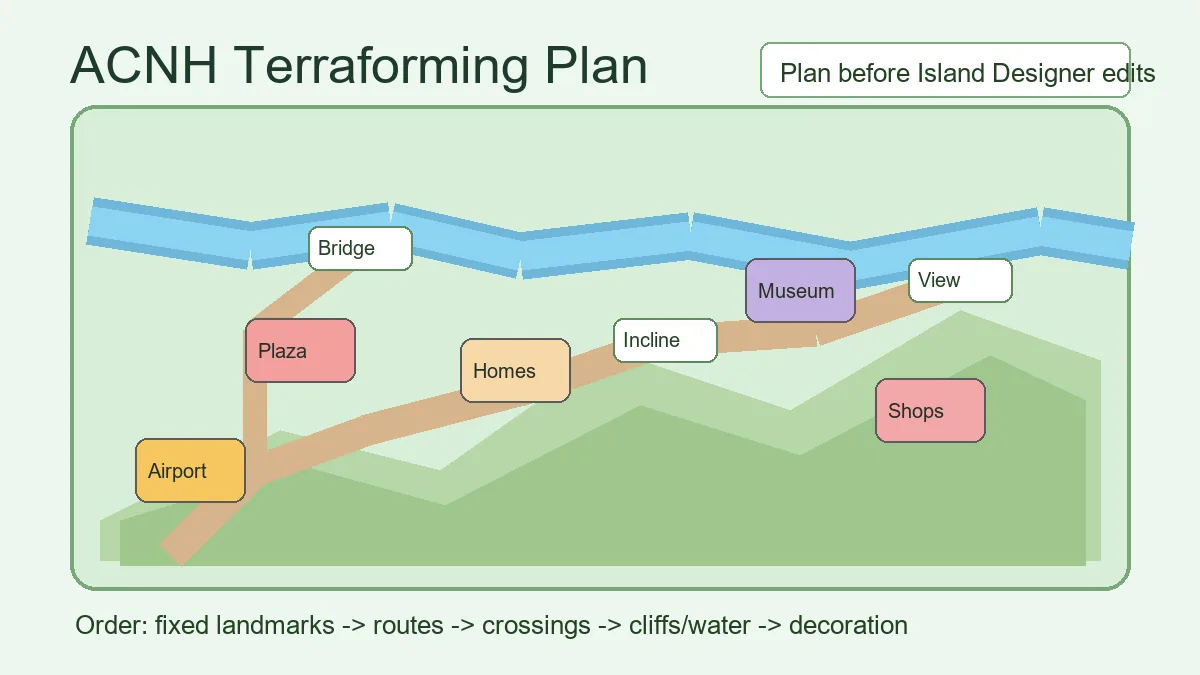
Comment commencer le terraforming ACNH étape par étape
Terraforming works best when it follows a plan rather than replacing one. The goal is not to flatten everything first. The goal is to know which terrain supports the route, which water divides zones, and which cliffs create useful height without blocking daily play.
Use the planner as a low-risk draft. When the route, buildings, bridges, and inclines are settled, move into the game and build in small passes. Save screenshots between phases so you can compare the planned map against what actually feels good when walking.
- Unlock the tools. Reach the point where the Island Designer app and construction permits are available, then decide which path, water, and cliff tools you truly need.
- Map fixed landmarks. Airport, Resident Services, river mouths, pier, beach rocks, and secret beach shape the island before any theme does.
- Plan movement first. Draw the entrance path, daily errand loop, beach access, shopping route, museum route, and visitor route before terrain.
- Place buildings and crossings. Homes, shops, museum, campsite, bridges, and inclines should be stable before you carve rivers or build mountains.
- Edit terrain in phases. Build the entrance, one core route, one major zone, then add secondary cliffs, ponds, waterfalls, and scenic pockets.
- Walk-test before decorating. If a path feels slow or a bridge feels wasted, fix the terrain before adding furniture, fencing, flowers, or custom designs.
6 décisions de terraforming qui évitent de tout refaire
Most failed terraforming projects are not caused by bad themes. They fail because routes, crossings, and scale were decided too late. Make these decisions before your first major cliff or river change.
Entrance height
Choose whether the airport route stays flat, climbs quickly, or reveals a plaza view.
- Idéal pour
- Players redesigning the first impression of the island.
- Préparation dans le planificateur
- Sketch one direct route and one scenic route from the airport to Resident Services.
- Note de construction
- Avoid a tall entrance cliff if it hides too much of the island or forces awkward inclines.
River control
Decide which rivers are functional dividers and which are decorative water features.
- Idéal pour
- River-heavy, cottagecore, natural, or city layouts.
- Préparation dans le planificateur
- Mark every bridge before widening rivers or creating canals.
- Note de construction
- Pretty water becomes frustrating when it blocks shops, beaches, or daily errands.
Cliff layers
Use cliffs to frame views, not to fill every empty tile.
- Idéal pour
- Mountain, forest, museum, and overlook builds.
- Préparation dans le planificateur
- Reserve open walking space at the base and top of each cliff area.
- Note de construction
- Too many small cliff pockets make the island hard to navigate.
Bridge and incline budget
Count crossings before finalizing rivers, waterfalls, and raised zones.
- Idéal pour
- Any island with separated neighborhoods or scenic areas.
- Préparation dans le planificateur
- List every daily route that needs a bridge or incline.
- Note de construction
- A scenic area that needs expensive access should also serve a real route or major focal point.
Path width
Choose where paths need one-tile charm and where they need two-tile comfort.
- Idéal pour
- Busy entrances, shopping streets, museum walks, and villager neighborhoods.
- Préparation dans le planificateur
- Mark main routes wider than decorative side paths.
- Note de construction
- Narrow paths look cute in screenshots but can feel cramped during daily play.
Future flex zones
Leave one area easy to change for seasons, events, or new themes.
- Idéal pour
- Players who redesign often.
- Préparation dans le planificateur
- Keep one flat or lightly shaped zone near storage, beach, or plaza access.
- Note de construction
- A flexible zone prevents every seasonal idea from becoming a full island reset.
Workflow terraforming : planificateur d’abord, Island Designer ensuite
A useful terraforming workflow separates planning from construction. In the planner, make large decisions: routes, buildings, crossings, rivers, cliffs, and zones. In the game, test feel: camera angle, path width, furniture density, and whether a route is pleasant to walk.
The ACNH Island Designer guide covers the broader planner workflow, while this page focuses on terrain construction choices. Use both when you want a map that looks good and still works for daily play.
| Stage | Decide in the planner | Test in-game |
|---|---|---|
| Before terraforming | Fixed landmarks, main zones, building moves, bridge and incline needs. | Whether the airport route and plaza connection feel natural. |
| First terrain pass | Main route, core river changes, essential cliffs, first crossings. | Walking speed, camera visibility, and whether paths feel too narrow. |
| Second terrain pass | Secondary ponds, waterfalls, overlooks, beaches, and scenic pockets. | Whether each scenic area has a reason to exist and an easy exit. |
| Final polish | Furniture zones, fencing, flowers, custom paths, and seasonal swaps. | Screenshots, object density, laggy-feeling clutter, and visitor clarity. |
Checklist terraforming ACNH
Use this checklist before spending Nook Miles, Bells, and hours reshaping your island.
Plan readiness
- Island Designer app and needed permits are unlocked.
- Airport, Resident Services, river mouths, pier, and beaches are marked.
- Homes, shops, museum, campsite, and daily routes have planned locations.
- Bridges and inclines are counted before major water or cliff edits.
Build readiness
- The entrance route works before decoration begins.
- Each cliff or water feature supports a route, view, or zone boundary.
- There is enough room around buildings for paths and furniture.
- One flexible area remains easy to redesign later.
Erreurs fréquentes de terraforming ACNH
These mistakes are common because terraforming gives you freedom before it gives you a finished plan.
- Flattening the whole island without a replacement map. A blank island can feel freeing for one day and overwhelming for weeks. Flatten only when you already have a staged rebuild plan.
- Building cliffs before routes. Cliffs decide where inclines go, so they should follow the walking plan rather than block it.
- Using water as decoration only. Ponds, canals, and waterfalls need space, crossings, and exits. If they slow every errand, simplify them.
- Copying a screenshot without matching fixed landmarks. Your airport, plaza, river mouths, and beaches may make the same idea impossible without adjustment.
- Decorating too early. Furniture hides route problems. Finish movement and terrain first, then add items and plants.
Références utiles pour le terraforming
Use these references to connect game mechanics with a practical planning workflow.
- ACNH Island Planning Guide - Internal guide for turning a rough island idea into zones, routes, and build phases.
- ACNH Map Designer Guide - Internal guide for testing fixed landmarks, terrain, bridges, and inclines before building.
- Nookipedia: Island Designer - Community reference for the Island Designer app and related permits.
- Nookipedia: Permit - Community reference for construction permits used by Island Designer.
FAQ terraforming ACNH
How do you unlock terraforming in ACNH?
Progress through the island development goals until the Island Designer app becomes available, then buy the waterscaping and cliff construction permits with Nook Miles.
Should I flatten my island before terraforming?
Only flatten if you already have a replacement plan. For most players, phased terraforming is safer because it preserves working routes and reduces decision fatigue.
What should I terraform first?
Start with the main route from the airport to Resident Services, then core building zones, essential crossings, and only then decorative cliffs, ponds, waterfalls, and scenic areas.
How many bridges and inclines should I plan before terraforming?
Plan every bridge and incline that supports daily routes before carving major rivers or cliffs. If a zone needs too many crossings for one small scene, simplify the terrain.
Does this replace an island planner or map designer?
No. This guide explains how to build terrain; the planner and map designer help you test the layout before spending time and Bells in-game.
Planifiez le terrain avant de le construire
Use the planner to test routes, cliffs, water, bridges, inclines, and build phases before making irreversible-looking changes in-game.
Ouvrir le planificateur ACNH gratuit